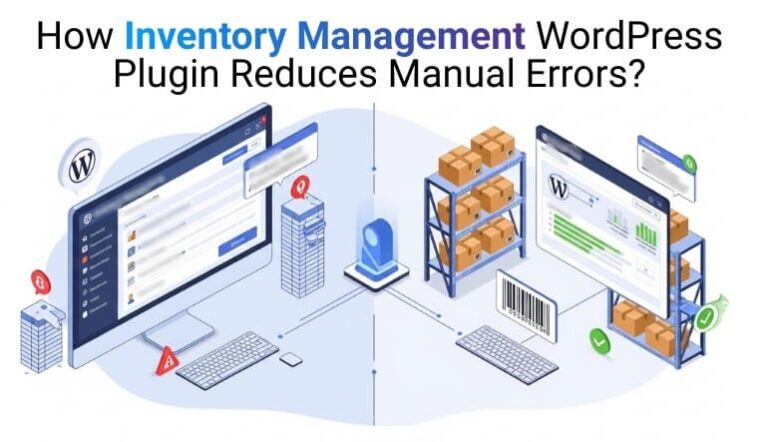

How Inventory Management WordPress Plugin Reduces Manual Errors?
Keeping inventory accurate in a growing WooCommerce store can feel overwhelming, especially when small mistakes turn into costly overselling or shipment delays. Many business owners search for clarity on how inventory management WordPress plugin reduces manual errors, because memory-based workflows simply can’t keep up with real-time demand. As stores expand, even minor missteps can quickly disrupt operations.
An inventory plugin solves these issues by automating stock updates, syncing locations, preventing data-entry mistakes, and keeping every change transparent. It replaces guesswork with consistent, system-driven accuracy that protects both revenue and customer trust. Continue reading to find out how these plugins turn messy inventory processes into a simplified, reliable workflow.
Why Manual Inventory in WooCommerce Creates So Many Errors?
Before exploring solutions, it’s important to understand why manual inventory falls apart in WooCommerce and creates consistent, costly mistakes.
- Overselling and Stockouts: Human-entered stock updates cause delays, allowing multiple customers to buy the last item, resulting in refunds, cancellations, and poor customer experience.
- Spreadsheets and Copy-Paste Chaos: Managing inventory across WooCommerce and spreadsheets creates mismatched data, copy-paste mistakes, outdated quantities, and SKU inconsistencies that quickly compound.
- Single-Location Stock in a Multi-Warehouse Reality: WooCommerce’s default single stock pool doesn’t reflect multiple warehouses or stores, forcing staff to guess fulfillment locations and increasing shipment errors.
- Human-Only Workflows Without Automation: Relying on someone to “check stock later” leads to unnoticed mistakes, missed alerts, no audit trails, and problems discovered only after customer complaints.
How Inventory Management WordPress Plugin Reduces Manual Errors?
Automated, event-driven workflows replace manual edits when using an inventory management WordPress plugin. Instead of relying on memory or spreadsheets, it ties inventory directly to system actions, ensuring accurate, consistent stock control. Here’s how it reduces manual errors effectively:
Real-Time Stock Sync With Orders and Returns
When an order is placed, the plugin instantly deducts stock. When an order is canceled or refunded, it restores stock automatically. This removes:
- Delayed stock updates
- Negative inventory values
- Overselling during busy periods
Technical insight: The plugin hooks into WooCommerce order status events and recalculates stock the moment those statuses change, ensuring accurate, real-time inventory control.
Centralized Inventory Dashboard for Faster, Safer Editing
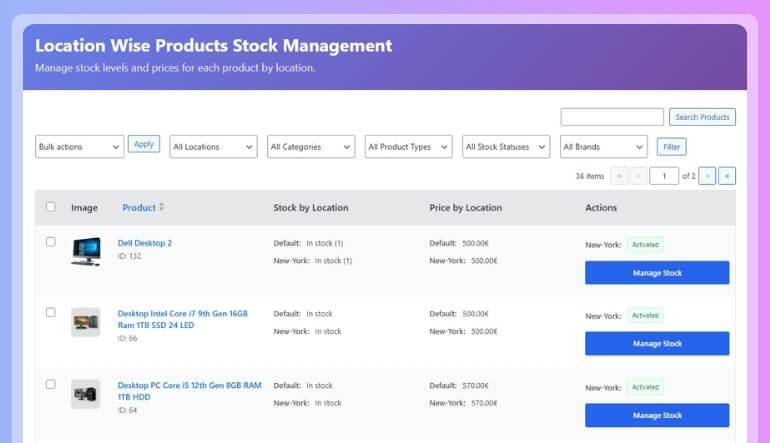
Instead of editing each product manually, plugins provide a single consolidated control panel where you can:
- Search products by SKU or name
- Bulk-edit stock quantities
- Filter low-stock items instantly
- Adjust pricing in batches
This interface reduces repetitive product-by-product editing, significantly lowering misclicks, skipped updates, and human oversight errors.
Multi-Location Logic and Smart Order Routing
For businesses using multiple warehouses, retail stores, or pickup points, inventory plugins introduce location-based intelligence:
- Assign and track stock individually for each warehouse
- Auto-route orders to the optimal fulfillment location
- Display stock availability per store
- Apply location-specific pricing or tax rules
This ensures correct shipping decisions, prevents out-of-stock confusion, and avoids marking products unavailable when another location actually has inventory.
Role-Based Access and Staff Guardrails
An inventory management wordpress plugin integrates tightly with WordPress user roles, allowing you to:
- Restrict who can edit stock
- Assign managers to specific warehouses or stores
- Lock down high-risk bulk operations for junior employees
Fewer people handling sensitive data = fewer operational mistakes.
Automation via APIs, Scheduled Imports & Webhooks
Larger stores commonly sync with ERP, POS, WMS, or marketplace systems. Advanced inventory plugins automate this through:
- Scheduled inventory imports
- Bulk stock updates via REST API
- Webhook-triggered synchronization across systems
This eliminates manual reconciliation and ensures every connected platform shares the same accurate inventory numbers, reducing cross-system mismatches.
Logs, Alerts, and Exception Reporting
High-quality inventory tools track every stock adjustment, recording:
- Who updated the stock
- What changed
- When it changed
In addition, low-stock alerts notify you early, while exception reports flag unusual activity such as sudden stock drops or inconsistent updates so you can correct issues before they affect customers.
Advanced Ways Plugins Prevent Human Error
Advanced inventory plugins prevent human errors through automation, validation, and real-time syncing, creating a reliable workflow for WooCommerce. Discover how these tools reduce manual mistakes below:
- Barcode and QR-Code Scanning: Barcode scanning removes SKU typing errors by ensuring staff always select the correct product and variation during receiving, picking, and returns.
- Smart Validation Rules: Plugins enforce numeric fields, prevent negative stock, require mandatory inputs, and follow pack-size rules to block inaccurate or impossible inventory entries.
- Guided Interfaces for Stock Transfers: Structured workflows for transfers, adjustments, and returns prevent skipped steps and reduce confusion by guiding staff through controlled, error-proof processes.
- Cycle Counting and Reconciliation Tools: Scheduled cycle counts compare physical and system stock, highlight discrepancies, and create tracked adjustments that prevent small mistakes from becoming significant issues.
- Multi-Channel Synchronization: Real-time inventory sync across WooCommerce, marketplaces, POS, and B2B platforms eliminates overselling by ensuring every channel updates immediately after each sale.
- Approval Workflows for High-Impact Changes: Draft submissions, manager reviews, and controlled approvals safeguard against major errors during bulk edits, imports, or high-risk adjustments made by staff.
- Batch, Lot, and Expiry Tracking: Tracking batches, expiry dates, and FIFO/FEFO rules prevents compliance errors and ensures expired or incorrect stock never ships to customers accidentally.
- Cart-Level Stock Reservation: Temporary reservation of inventory during checkout prevents race conditions and overselling when multiple customers attempt to buy the last remaining units.
- Smart Reordering Suggestions: Automated analysis of sales history predicts stockouts, flags fast-moving items, and recommends optimal reorder quantities to prevent shortages and emergency purchases.
- Backup and Version Control for Inventory: Exported snapshots, rollback capabilities, and historical data restoration let stores instantly recover from major mistakes instead of manually repairing thousands of SKUs.
Technical Deep Dive: How Plugins Integrate with WooCommerce
For technical readers, here’s a clear look at what happens under the hood when an inventory plugin connects to WooCommerce.
Extending Product Data
Inventory plugins expand WooCommerce’s product metadata to store advanced information, such as:
- Per-location stock values
- Reserved or allocated quantities
- Batch, lot, or expiry details
- Safety thresholds and reorder rules
This enhanced data model allows WooCommerce to manage far more complex inventory scenarios with precision.
Event-Driven Stock Adjustments
Plugins listen to key WooCommerce events and automatically recalculate stock when actions occur, including:
- Order creation and placement
- Payment confirmation
- Refund and cancellation processing
- Status transitions such as “processing” or “completed”
Each event triggers immediate inventory updates, ensuring real-time accuracy without manual intervention.
Handling Variations and Bundles
Advanced plugins correctly support complex product structures by managing:
- Variation-level stock (e.g., size, color, style)
- Bundle components and associated deductions
- Composite or kit-based product inventory
This prevents discrepancies caused by multi-SKU products and ensures accuracy even in large variable catalogs.
API and Background Processing
For stores with high SKU counts or frequent bulk changes, plugins rely on:
- REST API endpoints for external system syncing
- Background jobs to process large stock updates efficiently
- Scheduled tasks for automated imports, syncs, or recalculations
These background processes maintain performance while ensuring stock stays synchronized across systems.
How to Choose the Right Plugin for Error Reduction?
Choosing the right inventory plugin is essential for reducing manual mistakes and keeping WooCommerce stock accurate. Focus on features that automate updates, enforce rules, and maintain consistency across locations and systems. Check the table below to get full details:
| What to Prioritize | Why It Reduces Errors |
| Real-time stock updates | Prevents overselling and ensures accurate quantities during high traffic. |
| Multi-location support | Eliminates confusion across warehouses and ensures correct fulfillment routing. |
| Validation rules | Blocks invalid entries like negative stock or incorrect formats. |
| Logs and reporting | Tracks every change and highlights anomalies before they escalate. |
| API integration | Syncs WooCommerce with ERP, POS, or marketplaces to avoid mismatched inventory. |
| Barcode compatibility | Removes SKU typing errors and ensures accurate product selection. |
| Approval workflows | Prevents risky bulk edits from being applied without review. |
Additional Checks Before Choosing a Plugin
- Active Development & Frequent Updates: Ensures long-term stability and continuous improvements. Solutions such as Multi Location Inventory Management for WooCommerce by Plugincy illustrate how modern plugins evolve to support complex inventory needs.
- Woocommerce Version Compatibility: Prevents conflicts and avoids inventory calculation errors caused by outdated or incompatible code.
- Clear Documentation & Dependable Support: Helps your team set up features properly, resolve issues faster, and avoid errors during the setup process.
- Performance Scalability: Ensures smooth operation even with large product catalogs, high order volume, or multi-location setups.
Implementation Roadmap: Transitioning from manual confusion to a dependable inventory system.
Transforming WooCommerce inventory from error-prone to reliable isn’t about installing a plugin; it’s about realigning your data, workflows, and team with how automated inventory systems actually operate. This roadmap focuses specifically on error reduction, not just setup.
Step 1 – Audit How Your Inventory Actually Operates (Not Just Where It Lives)
Before introducing automation, identify the root causes of errors by mapping:
- Where inventory truth exists (WooCommerce tables, spreadsheets, POS, ERP, marketplaces).
- Who makes stock adjustments and under what conditions.
- The highest-impact errors: overselling, mis-picks, double-counting, wrong location fulfillment, or delayed updates.
This step reveals workflow gaps, not just data issues, and ensures the plugin addresses real operational failures, not assumptions.
Step 2 – Clean, Normalize, and Standardize Your Inventory Data Before Anything Else
Inventory plugins automate accuracy, not fix flawed data. Prepare your environment by:
- Standardizing SKUs so product matching doesn’t break.
- Merging duplicates that confuse stock calculations.
- Creating consistent naming structures for locations, batches, or product groups.
Clean data ensures automation behaves predictably, preventing cascading errors that originate from inconsistent records.
Step 3 – Deploy and Configure the Plugin in a Staging Environment with Error Scenarios in Mind
Instead of a basic install, perform a scenario-based setup on staging:
- Install the plugin, activate modules, and import a controlled subset of products.
- Create inventory locations and assign routing logic intentionally.
- Set thresholds, low-stock rules, and validation layers designed to catch your top recurring mistakes.
This approach simulates your store’s real pressure points and prevents misconfigurations from leaking into production.
Step 4 – Operationalize Locations, Permissions, Alerts, and Safety Controls
Now configure the key safeguards that reduce human error:
- Assign stock and pricing at the location level, mirroring physical workflows.
- Define user roles with strict boundaries limiting who can adjust stock, override values, or perform transfers.
- Set automated alerts and exception triggers so issues surface early, not when customers complain.
These controls turn your plugin into an operational safety system, not just a data tool.
Step 5 – Connect External Systems Using Structured Sync Logic (ERP, POS, Marketplaces)
Instead of syncing everything at once, connect systems in controlled phases:
- Sync warehouse stock first to stabilize your core source of truth.
- Integrate POS transactions to account for retail movement.
- Connect marketplace sales last, mapping SKUs, channels, and order flows.
This layered integration prevents synchronization conflicts and reduces the risk of multi-channel errors.
Step 6 – Run End-to-End Workflow Simulations, Not Simple Test Orders
Test the full lifecycle of inventory behavior, including:
- Orders fulfilled from different locations.
- Partial refunds, cancellations, and stock rollbacks.
- Transfers between warehouses and subsequent recalculations.
Monitor which fields change, how fast updates occur, and whether logs and alerts record each action correctly. Fix issues before any real customer interacts with the system.
Step 7 – Train Your Team Using Real Scenarios and Error-Focused Playbooks
Your plugin won’t prevent errors if staff don’t understand how workflows have changed. Train your team by:
- Demonstrating the new dashboard and structured workflows.
- Showing how to handle exceptions: returns, adjustments, transfers, discrepancies.
- Explaining what alerts mean and the correct response sequence.
Begin with one location or product group, gather feedback, refine permissions and workflows, then roll out fully.
Conclusion
Manual inventory in WooCommerce often leads to overselling, stockouts, and constant data mismatches. By understanding how inventory management WordPress plugin reduces manual errors, store owners can shift from reactive fixes to automated control. Real-time stock updates, location-based tracking, validation rules, and smart alerts work together to stop mistakes before they affect customers.
The real benefit goes beyond convenience. With structured workflows, system-driven updates, and controlled access, your inventory becomes reliable and predictable. Instead of chasing errors, you gain clarity, speed, and confidence in every order. Implementing the right approach converts inventory from a daily risk into a stable foundation for long-term growth.
Read More Informative Blogs At Mypasokey