
How Secure Is Public WiFi? Risks, Safety Tips & Best Practices
Introduction to Public WiFi Security
Public WiFi has become part of everyday digital life. From coffee shops and airports to hotels and shopping malls, free internet access feels convenient and harmless. But a common question still worries users: how secure is public WiFi really? Many people connect without thinking about what happens behind the scenes. This introduction sets the foundation for understanding public WiFi security, the risks involved, and why awareness matters. Knowing how public networks work and where they fail helps users make smarter decisions, protect personal data, and avoid unnecessary exposure to cyber threats while staying connected on the go.
Understanding What Public WiFi Networks Are
Public WiFi refers to wireless internet networks that are freely available to anyone within range. These networks usually require no password or use a shared one provided by the location owner. Technically, public WiFi routes your device’s data through a common access point used by many users at the same time. Because accessibility is prioritized over protection, security controls are often minimal. This open nature makes public WiFi attractive, but it also creates opportunities for attackers. Understanding this structure is essential before trusting public networks with sensitive browsing or personal information.
Why Public WiFi Networks Pose Security Risks
Public WiFi networks are risky because they are designed for convenience, not protection. Unlike home or corporate networks, most public hotspots lack strong authentication and encryption. Anyone nearby can connect, including malicious actors. Since data travels openly across the network, attackers can intercept information without much effort. These risks increase when users access emails, logins, or financial accounts. The absence of strict monitoring also means suspicious activity often goes unnoticed. This combination of openness, anonymity, and weak security makes public WiFi an easy target for cybercriminals.
You Might also Like Ksözcü Meaning, Origin & Digital Significance Explained
Absence of Data Encryption on Public Networks
Many public WiFi networks transmit data without encryption between your device and the network access point.This means information such as usernames, passwords, and messages can be viewed by attackers using simple tools. Without encryption, data travels in readable form, making interception much easier. Even users visiting normal websites may unknowingly expose private details. Encryption acts like a protective tunnel, and when it’s missing, your data is essentially traveling in the open. This is one of the most serious weaknesses of public WiFi connections.
Risks of Shared and Open Network Environments
Public WiFi is a shared environment where multiple unknown users connect to the same network simultaneously. This increases exposure because attackers are already inside the network with legitimate users. In such setups, hackers can monitor traffic, scan connected devices, or exploit weak security settings. Since there’s no way to verify who else is connected, trust becomes a major issue. Shared networks remove the separation that normally protects users, making it easier for cybercriminals to blend in and launch silent attacks without raising suspicion.
Major Security Threats Associated with Public WiFi
Public WiFi exposes users to several well-known cybersecurity threats. These threats target both data and devices, often without the victim realizing it. Attackers take advantage of weak configurations, lack of encryption, and user inattention. Common threats include data interception, identity theft, and malware injection. What makes these attacks dangerous is how quietly they happen. Users may believe they are simply browsing the internet, while in reality, their activity is being monitored or manipulated. Understanding these threats is key to staying alert and minimizing risk.
Man-in-the-Middle Attacks Explained
A Man-in-the-Middle attack happens when a hacker secretly positions themselves between your device and the WiFi network. Instead of communicating directly with the hotspot, your data passes through the attacker first. This allows them to read, modify, or steal information without detection. Login credentials, messages, and sensitive data are common targets. These attacks are especially effective on public WiFi because users expect open connections and rarely verify network security, giving attackers an easy opportunity to intercept communication.
Rogue Hotspots and Evil Twin WiFi Networks
Rogue hotspots, often called Evil Twin networks, are fake WiFi connections designed to look legitimate. Attackers create hotspots with names similar to real public networks, such as a café or airport WiFi. Unsuspecting users connect without verifying authenticity. Once connected, attackers can monitor traffic, steal credentials, or inject malicious content. These networks are particularly dangerous because they rely on user trust and visual familiarity. Many people don’t realize they’ve connected to a fake network until damage is already done.
Packet Sniffing and Network Eavesdropping
Packet sniffing is a technique where attackers capture data packets traveling across a WiFi network. On public WiFi, this becomes easier because traffic is often unencrypted. Using readily available tools, attackers can collect browsing activity, login information, and personal data. Network eavesdropping doesn’t require advanced hacking skills, which makes it more common than users expect. Even basic online activity can reveal valuable information. This silent form of monitoring highlights why public WiFi should never be trusted for sensitive communication.
Can Public WiFi Compromise Personal and Financial Data?
Yes, public WiFi can put both personal and financial data at risk if proper precautions are not taken. When users sign in to accounts, share personal details, or access cloud services on unsecured networks, attackers may intercept that information. Data such as email credentials, saved passwords, and credit card details are especially valuable targets. Even if the attack isn’t immediate, stolen data can be misused later. Because public WiFi lacks strict access controls, users often don’t realize how exposed their digital identity becomes during seemingly harmless browsing sessions.
Is It Safe to Access Banking and Shopping Websites on Public WiFi?
Accessing banking or online shopping websites on public WiFi is generally discouraged. While many financial platforms use strong encryption, public networks still introduce additional risks. Attackers may exploit weak connections, fake hotspots, or compromised devices to capture sensitive information. Even a momentary session can expose login credentials or session cookies. For this reason, cybersecurity experts recommend avoiding financial transactions on public WiFi whenever possible. If access is unavoidable, additional security measures should always be used to reduce potential exposure.
How Cybercriminals Exploit Unsecured Public WiFi Networks
Cybercriminals exploit public WiFi by targeting its weakest points: lack of encryption, open access, and user trust. They may monitor traffic, inject malicious scripts, or redirect users to fake websites. Some attackers spread malware through infected downloads or pop-ups triggered by the network itself. Others focus on stealing credentials quietly over time. Because public WiFi environments are anonymous and poorly monitored, criminals face little resistance. This makes public networks an attractive and low-risk hunting ground for digital attacks.
Best Practices for Staying Secure on Public WiFi
Staying secure on public WiFi requires a combination of awareness and smart habits. Users should assume that any public network is potentially unsafe and act accordingly. Simple actions like limiting sensitive activity, verifying secure connections, and adjusting device settings can significantly reduce risk. Cybersecurity is not about avoiding the internet altogether, but about using it responsibly. With the right precautions, users can still enjoy the convenience of public WiFi while minimizing exposure to common threats and maintaining better control over their personal data.
Using a Virtual Private Network (VPN)
A VPN creates an encrypted tunnel between your device and the internet, making it much harder for attackers to intercept data. When connected to public WiFi, a VPN hides your online activity and masks sensitive information from prying eyes. Even if someone monitors the network, they won’t be able to read the encrypted data. This added layer of protection is one of the most effective ways to secure public WiFi usage, especially for frequent travelers and remote workers.
Ensuring Secure Connections Through HTTPS
HTTPS adds an extra layer of security by encrypting data exchanged between your browser and a website. Websites using HTTPS help protect information like login credentials and form submissions. While HTTPS does not secure the entire network, it reduces the risk of data interception. Users should always check for HTTPS in the address bar before entering any personal information. Browser warnings should never be ignored, especially on public WiFi, where attackers often exploit unsecured or fake websites.
Managing Device Settings to Reduce Exposure
Proper device settings can significantly lower public WiFi risks. Disabling automatic WiFi connections prevents devices from joining unknown networks without permission. Turning off file sharing and Bluetooth reduces the chances of unauthorized access. Keeping operating systems and apps updated also closes known security gaps. These small adjustments create a stronger defense against common attacks. Managing device behavior may seem minor, but it plays a critical role in protecting personal data on open networks.
Evaluating the Safety of Different Public WiFi Locations
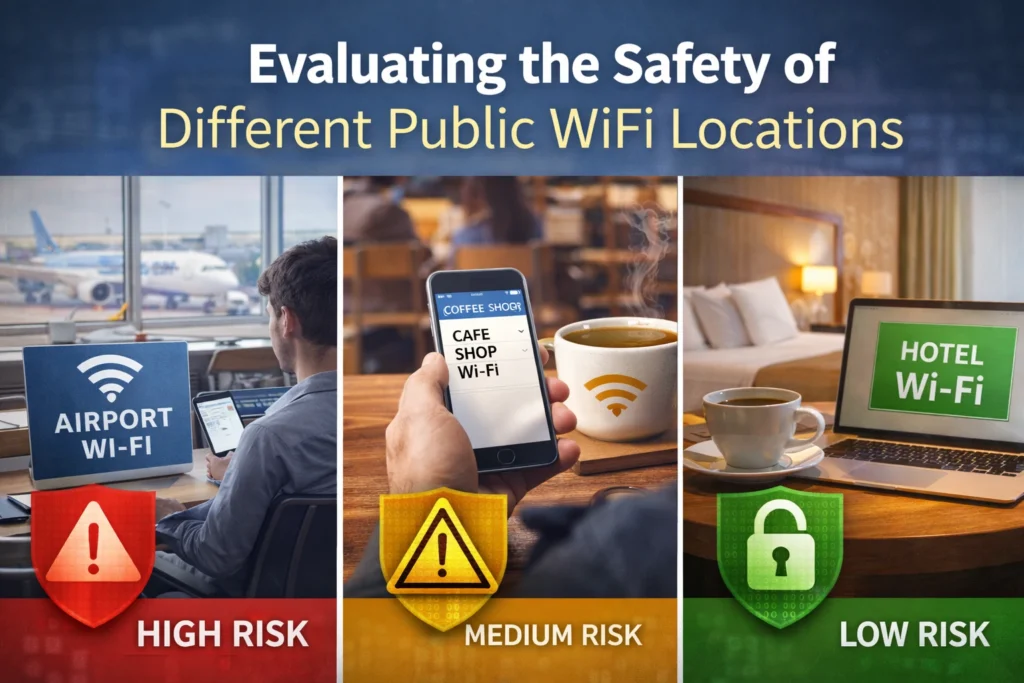
Not all public WiFi locations carry the same level of risk. Airports, hotels, and large cafes may offer managed networks with basic security controls, while smaller or informal hotspots often lack oversight. However, even trusted locations are not immune to threats. High-traffic areas attract attackers because of the large number of users. Evaluating the environment, verifying network names, and avoiding unknown hotspots can help users make safer choices when connecting outside their home or office.
You Might also Like What is Grospal
Public WiFi vs Mobile Hotspot: A Security Comparison
Mobile hotspots are generally more secure than public WiFi because they create a private connection between your device and the internet. Unlike public networks, hotspots limit access to authorized users only. This reduces the risk of data interception and unauthorized monitoring. While mobile data usage may have limits, the added security often outweighs the convenience of free WiFi. For sensitive tasks like banking or work-related access, a mobile hotspot is usually the safer and more reliable option.
Final Assessment – How Secure Is Public WiFi?
Public WiFi is not inherently unsafe, but it is far from fully secure. Its open design, shared access, and limited protections make it vulnerable to a wide range of cyber threats. While casual browsing may seem harmless, sensitive activities can quickly turn risky without proper safeguards. The key issue is user awareness. Public WiFi should be treated as a convenience, not a trusted environment. By understanding the risks and applying smart security habits, users can reduce exposure. Ultimately, public WiFi security depends less on the network itself and more on how responsibly it is used.
Key Takeaway for Safe Public WiFi Usage
Public WiFi should always be approached with caution. Users who stay informed, limit sensitive activity, and use basic security tools can significantly reduce risks. Small actions like choosing secure connections, managing device settings, and avoiding unnecessary data sharing go a long way. The goal isn’t to avoid public WiFi entirely, but to use it wisely. When convenience meets awareness, users can stay connected without compromising their privacy or digital safety.
Frequently Asked Questions (FAQs)
Is public WiFi safe to use?
Public WiFi is convenient but often insecure, especially without encryption or proper network controls.
Can hackers steal data on public WiFi?
Yes, attackers can intercept data on unsecured public networks if safety measures aren’t used.
Is public WiFi safe for online banking?
Online banking on public WiFi is risky and should be avoided unless strong protection is enabled.
Does HTTPS fully protect me on public WiFi?
HTTPS helps encrypt data, but it doesn’t protect against all public WiFi threats.
Should I use a VPN on public WiFi?
Yes, a VPN encrypts your traffic and greatly improves security on public networks.Is a mobile hotspot safer than public WiFi?
A mobile hotspot is usually safer because it provides a private, controlled connection.
Read More Informative Information At Mypasokey