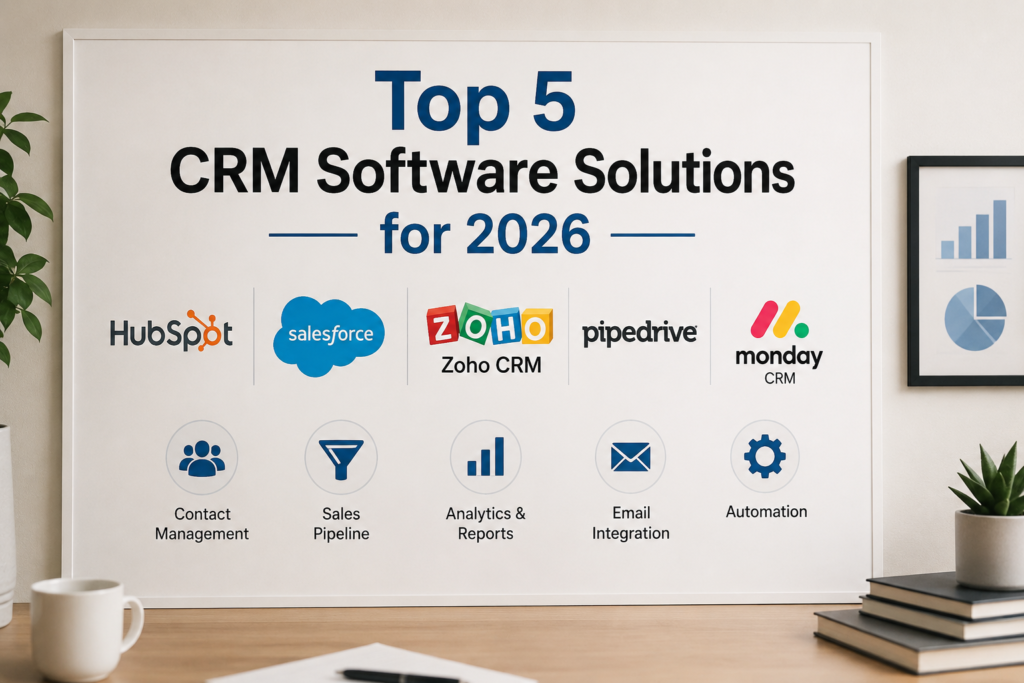

Customer Relationship Management (CRM) software helps businesses organize customer data, manage sales activities, and improve communication across teams. Instead of storing information in spreadsheets or scattered tools, a CRM centralizes everything in one place. This gives businesses a complete view of their customers and prospects. According to research from Nucleus Research, CRM platforms can deliver an average return of more than $8 for every dollar invested, making them one of the most valuable business technologies available today. Whether you run a startup, small business, or large enterprise, a CRM can help streamline operations, improve customer experiences, and support long-term growth.
CRM Explained in Simple Terms
A CRM is a software platform designed to help businesses track and manage interactions with customers and leads. Think of it as a digital hub where sales, marketing, and customer support teams can access important information about every contact. Instead of searching through emails or spreadsheets, employees can quickly find customer histories, notes, and communication records, helping them provide faster and more personalized service.
💚 You might also like: Future of Wearable Technology Beyond Smartwatches
How CRM Improves Customer Relationships
Strong customer relationships are built on timely communication and personalized experiences. CRM software stores detailed customer information, making it easier to understand preferences, purchase history, and previous interactions. This allows businesses to deliver relevant recommendations and faster support. Studies show that customers are more likely to stay loyal to brands that offer personalized experiences, and a CRM helps businesses consistently meet those expectations.
Key Benefits of Using CRM Software
CRM software offers several advantages beyond contact management. It helps automate repetitive tasks, improves team collaboration, tracks sales performance, and provides valuable business insights. Companies can monitor customer journeys from the first interaction to the final purchase. Automation features reduce manual work, while reporting tools help managers make informed decisions based on real-time data rather than assumptions.
Who Should Use a CRM?
Whether you’re running a small startup or a large corporation, CRM software can help organize customer data and strengthen business relationships. Small businesses can use it to stay organized and manage growth, while larger organizations can handle complex customer relationships across multiple departments. Sales teams use CRMs to track leads, marketing teams use them to manage campaigns, and customer support teams rely on them to resolve issues efficiently. Any organization that values customer relationships can benefit from a CRM system.
💚 You might also like: How Small Businesses Compete in 2026
How We Selected the Five Best CRM Platforms
With hundreds of CRM solutions available, choosing the right one can be challenging. To identify the five best CRM platforms, we evaluated each option using criteria that matter most to businesses. We focused on usability, automation capabilities, pricing, scalability, integrations, and customer support. We also considered user reviews, industry reputation, and overall value for money. This approach ensures that our recommendations serve a variety of business sizes and needs, from startups looking for affordability to enterprises requiring advanced customization and workflow automation.
Ease of Use
We evaluated each platform based on interface design, navigation, onboarding experience, and learning curve. Software that allows teams to become productive quickly scored higher. User-friendly dashboards and intuitive workflows can significantly improve adoption rates and help businesses maximize their CRM investment.
Features and Automation
Modern CRM systems must do more than store contact information. We examined sales automation, marketing tools, customer service features, analytics, reporting, and artificial intelligence capabilities. Platforms offering advanced automation received higher ratings because they help businesses save time, reduce errors, and improve productivity across departments.
Pricing and Value
Cost is an important factor for businesses of every size. We compared subscription plans, included features, scalability options, and overall return on investment. A CRM does not have to be the most expensive option to provide excellent value. We prioritized solutions that deliver strong functionality while maintaining competitive and transparent pricing structures.
Integrations and Scalability
Businesses often rely on multiple software tools to manage daily operations. We reviewed how well each CRM integrates with email platforms, accounting software, project management tools, and marketing applications. Scalability was also considered because a CRM should support business growth without requiring a complete system replacement in the future.
💚 You might also like: How to Start a Small Business with Low Investment in 2026
Customer Support and Reliability
Reliable customer support can make a significant difference when technical issues arise. We assessed support channels, response times, training resources, and platform uptime. CRM providers that consistently deliver dependable performance and responsive customer service earned higher rankings because businesses need systems they can trust every day.
Quick Comparison of the Five Best CRM Software
Before exploring each CRM in detail, it is helpful to compare their strengths side by side. Every platform on this list serves a different audience and business objective. Some prioritize affordability, while others focus on enterprise-level customization or advanced sales management. Comparing features, pricing, and ideal use cases allows businesses to identify the solution that aligns best with their goals, team size, and budget. This overview provides a quick snapshot of what each CRM does best before diving deeper into individual reviews.
Features Comparison Table
The comparison table highlights essential CRM capabilities such as contact management, sales automation, reporting, marketing tools, AI features, and third-party integrations. By reviewing these core functions together, businesses can quickly identify which platform offers the tools necessary to support their specific workflows and customer management strategies.
💚 You might also like: Egli Plastic: Modern Packaging Solutions for Swiss Businesses
Pricing Overview
CRM pricing varies significantly depending on features and user requirements. Some platforms offer generous free plans, while others focus on premium enterprise solutions. Reviewing pricing structures helps businesses understand potential costs and identify options that provide the best balance between affordability and functionality for their operational needs.
Best Use Cases at a Glance
Every CRM excels in different areas. Some are ideal for startups seeking simplicity, while others are built for large organizations with complex sales processes. Understanding the best use cases helps businesses avoid unnecessary features and select a platform that aligns with their current objectives and future growth plans.
HubSpot CRM
HubSpot CRM has become one of the most popular CRM solutions worldwide, particularly among startups and small businesses. Its free plan provides access to powerful tools that many competitors reserve for paid subscriptions. The platform combines sales, marketing, customer service, and content management capabilities within a unified ecosystem. With an intuitive interface and extensive educational resources, HubSpot allows teams to implement CRM processes quickly. As businesses grow, they can upgrade to advanced features without migrating to a completely different platform, making it a highly scalable solution.
Key Features
HubSpot CRM includes contact management, deal tracking, email marketing, meeting scheduling, live chat, reporting dashboards, and workflow automation. It also integrates seamlessly with numerous third-party applications. AI-powered tools and customizable pipelines help businesses streamline operations while maintaining a clear view of customer interactions throughout the sales cycle.
💚 You might also like: Fiverr vs Upwork: Which Is Better in 2026? (Full Comparison Guide)
Pros and Cons
The biggest advantage of HubSpot CRM is its generous free plan and user-friendly interface. Businesses can start using powerful CRM features without significant investment. However, advanced marketing automation and enterprise-level capabilities can become expensive as organizations scale. Some users also find that premium add-ons increase overall costs over time.
Pricing
HubSpot offers a free CRM plan that supports unlimited users and essential customer management tools. Paid plans vary depending on selected hubs and features. Businesses can choose scalable packages that match their requirements, making HubSpot suitable for both startups and expanding organizations seeking flexibility.
Best For
HubSpot CRM is best for startups, small businesses, and growing companies that want an easy-to-use CRM with strong marketing and sales capabilities. It is particularly valuable for organizations looking to start with a free solution while maintaining the option to scale as business needs evolve.
Salesforce CRM
Salesforce is widely recognized as one of the most powerful CRM platforms in the world. It serves organizations ranging from mid-sized businesses to global enterprises. Known for extensive customization options, advanced analytics, and robust automation capabilities, Salesforce enables businesses to build highly tailored customer management systems. The platform supports complex workflows, large sales teams, and sophisticated reporting requirements. While it may require a greater investment of time and resources to implement, Salesforce delivers exceptional flexibility and scalability for organizations with demanding operational needs.
💚 You might also like: Zero Dep vs Engine Protect for Bikes: Which Cover Matters More?
Key Features
Salesforce offers lead management, opportunity tracking, workflow automation, artificial intelligence through Einstein AI, advanced reporting, forecasting tools, and extensive integration capabilities. Businesses can customize dashboards, automate complex processes, and gain deeper visibility into customer behavior through powerful analytics features.
Pros and Cons
Salesforce provides unmatched customization and scalability, making it a preferred choice for enterprise organizations. Its extensive ecosystem and advanced features support highly complex business operations. However, the platform has a steeper learning curve than many competitors, and implementation costs can be higher for businesses with limited budgets.
Pricing
Salesforce offers multiple pricing tiers designed for different business sizes and requirements. Entry-level plans provide core CRM functionality, while premium plans include advanced automation, AI tools, and enterprise-grade customization. Costs vary based on features, user counts, and implementation requirements.
Best For
Salesforce CRM is best for medium-sized businesses and large enterprises that require advanced customization, deep analytics, and scalable infrastructure. Organizations with complex sales processes and long-term growth plans often choose Salesforce because of its flexibility and ability to adapt to evolving business needs.
💚 You might also like: SEO vs Paid Ads in 2026: Which Strategy Delivers Higher ROI?
Zoho CRM
Zoho CRM has established itself as one of the most affordable and feature-rich CRM solutions available for small businesses. It offers a balance of functionality, customization, and pricing that appeals to organizations with limited budgets. Used by businesses across various industries, Zoho CRM provides tools for sales automation, lead management, workflow creation, and customer engagement. The platform is part of the larger Zoho ecosystem, allowing businesses to connect CRM operations with accounting, email marketing, project management, and customer support tools. Its flexibility makes it a practical choice for businesses seeking long-term growth without overspending.
Key Features
Zoho CRM includes lead and contact management, workflow automation, AI-powered sales assistance, email integration, sales forecasting, and advanced analytics. Businesses can customize modules, automate repetitive tasks, and monitor customer interactions from a centralized dashboard. The platform also supports mobile access, making it easier for teams to stay productive while working remotely.
Pros and Cons
Zoho CRM delivers excellent value by offering advanced features at competitive pricing. It is highly customizable and integrates with numerous business applications. However, some users report that the interface can feel overwhelming initially due to the large number of available features. Proper setup may require additional time for new users.
Pricing
Zoho CRM offers a free plan for small teams along with several paid tiers designed for growing businesses. Pricing remains affordable compared to many competitors, making it attractive for organizations that need advanced CRM capabilities without committing to expensive enterprise-level subscriptions.
Best For
Zoho CRM is best suited for small businesses, startups, and growing companies seeking a cost-effective solution with strong customization options. It is particularly valuable for organizations that already use other Zoho products and want to create a connected business management ecosystem.
💚 You might also like: Smart Marketing Strategies for Business Growth in 2026
Pipedrive CRM
Pipedrive was designed with sales professionals in mind, making pipeline management its greatest strength. Unlike many CRM platforms that attempt to serve every department equally, Pipedrive focuses heavily on helping sales teams manage opportunities and close deals more efficiently. The visual pipeline interface makes it easy to track prospects through every stage of the sales process. Businesses gain clear visibility into sales activities, performance metrics, and revenue opportunities. For organizations that prioritize sales growth and straightforward workflow management, Pipedrive offers a highly practical and user-friendly CRM experience.
Key Features
Pipedrive includes visual sales pipelines, deal tracking, workflow automation, activity reminders, email synchronization, sales forecasting, and reporting tools. Users can monitor opportunities in real time and automate repetitive administrative tasks. The platform also offers AI-powered recommendations that help sales representatives identify high-priority opportunities.
Pros and Cons
Pipedrive excels in simplicity, usability, and sales-focused functionality. Teams can quickly adopt the platform without extensive training. However, it offers fewer marketing and customer service features compared to more comprehensive CRM platforms. Businesses requiring all-in-one functionality may need additional software integrations.
Pricing
Pipedrive provides multiple subscription plans designed for businesses of different sizes. Pricing remains competitive within the CRM market, and organizations can scale features as sales operations grow. Most plans include core pipeline management tools, while advanced tiers unlock additional automation and reporting capabilities.
Best For
Pipedrive is ideal for sales-driven organizations, small businesses, and growing teams that need a streamlined CRM focused on pipeline visibility and deal management. Companies seeking simplicity and strong sales performance tracking often find Pipedrive to be an excellent fit.
Monday CRM
Monday CRM combines traditional customer relationship management capabilities with advanced project management and collaboration features. Built on the flexible Monday.com platform, it enables teams to customize workflows according to their specific processes. The platform emphasizes visibility, communication, and operational efficiency, making it particularly valuable for organizations that manage complex projects alongside customer relationships. Businesses can coordinate sales, marketing, customer service, and project delivery activities within a single workspace. This collaborative approach helps reduce information silos and improve productivity across departments.
Key Features
Monday CRM offers customizable workflows, lead tracking, sales automation, project management tools, reporting dashboards, team collaboration features, and integration support. Users can create tailored pipelines and automate routine tasks. Visual dashboards provide real-time insights into project progress, customer interactions, and overall business performance.
Pros and Cons
Monday CRM stands out for its flexibility and collaboration-focused design. Teams can easily adapt workflows to match unique business requirements. However, businesses seeking highly advanced CRM-specific features may find some competitors offer deeper sales and marketing functionality. Customization options can also require additional setup time. It offers contact management, deal tracking, reporting, email integration, and a range of sales-focused features at no cost. This makes it a practical choice for startups and growing businesses looking to streamline customer relationships without investing in expensive software.
Pricing
Monday CRM offers tiered pricing plans that scale according to team size and feature requirements. Businesses can start with essential CRM functionality and upgrade as operational needs expand. The platform’s flexible pricing structure makes it suitable for both smaller teams and larger organizations.
Best For
Monday CRM is best for businesses that prioritize collaboration, workflow management, and cross-functional teamwork. Organizations managing both customer relationships and project execution can benefit significantly from its flexible and highly visual platform.
How to Choose the Right CRM for Your Business
Selecting the right CRM requires more than comparing feature lists. The best solution depends on your business objectives, team structure, growth plans, and budget. A CRM should support existing workflows while providing room for future expansion. According to industry studies, CRM adoption can significantly improve customer retention and sales performance when aligned with business goals. Taking time to evaluate your requirements before making a decision helps avoid costly migrations later. By focusing on key factors such as objectives, integrations, scalability, and usability, businesses can confidently choose a CRM that delivers long-term value.
Identify Your Business Goals
Begin by defining what you want to achieve with a CRM. Some businesses focus on improving sales performance, while others prioritize customer service or marketing automation. Clear goals help narrow the selection process and ensure the chosen platform provides the features necessary to support business growth and operational efficiency.
💚 You might also like: London Gold Centre Guide: Trusted UK Gold Trading Platform
Consider Team Size
The size of your team plays a major role in CRM selection. Smaller businesses may prioritize simplicity and affordability, while larger organizations often require advanced automation and customization. Choosing a CRM that aligns with current staffing levels while supporting future expansion can help avoid unnecessary upgrades and disruptions.
Evaluate Integration Requirements
Most businesses rely on multiple software tools to manage operations. Before selecting a CRM, evaluate its ability to integrate with email platforms, accounting software, marketing tools, and communication applications. Strong integrations reduce manual data entry and create a more connected and efficient technology ecosystem.
Set a Realistic Budget
A CRM should deliver measurable value without exceeding financial limitations. Consider subscription fees, implementation costs, training requirements, and future scalability. While affordable options may seem attractive, businesses should focus on long-term return on investment rather than choosing solely based on the lowest price.
Test CRM with Free Trials
Many CRM providers offer free trials or free plans that allow businesses to evaluate functionality before committing financially. Testing multiple platforms helps teams understand usability, workflow compatibility, and feature relevance. A hands-on evaluation often reveals strengths and limitations that may not be apparent from product descriptions alone.
💚 You might also like: Best AI Tools for Beginners in 2026 | AI Productivity Guide
Frequently Asked Questions About CRM Software
CRM software continues to be one of the most important business technologies for managing customer relationships and driving growth. Despite its widespread adoption, many business owners still have questions about implementation, pricing, and overall value. The following answers address some of the most common concerns associated with CRM platforms. Understanding these fundamentals can help organizations make informed decisions and maximize the benefits of their CRM investment.
What Is the Best CRM for Small Businesses?
The best CRM for small businesses depends on specific needs and budgets. Zoho CRM is often favored for affordability and customization, while HubSpot CRM is popular because of its generous free plan and ease of use. When choosing a CRM, small businesses should focus on factors such as scalability, ease of use, and integration options to ensure the platform can support their growth and work seamlessly with existing tools.
Which CRM Has the Best Free Plan?
HubSpot CRM is widely regarded as one of the strongest free CRM options available. It offers sales features without requiring a paid subscription. This makes it an excellent starting point that provides contact management, deal tracking, reporting tools, email integration, and various features for startups and growing businesses.
Is CRM Worth It for Startups?
Yes, CRM software can provide substantial value for startups. It helps organize customer information, improve lead management, automate repetitive tasks, and support business growth. Establishing strong customer relationship processes early often creates a foundation for long-term success and operational efficiency.
💚 You might also like: Best Digital Marketing Strategies in 2026 | Ultimate Growth Guide
Can CRM Improve Sales Performance?
CRM software can significantly improve sales performance by providing better visibility into customer interactions, automating follow-ups, and identifying revenue opportunities. Research consistently shows that businesses using CRM systems often experience improvements in lead conversion rates, customer retention, and overall sales productivity.
How Much Does CRM Software Cost?
CRM pricing varies depending on features, user counts, and provider offerings. Some platforms provide free plans, while paid subscriptions can range from a few dollars per user per month to enterprise-level pricing. Businesses should evaluate total value, scalability, and required functionality rather than focusing solely on cost.
✨ Liked this breakdown? Stick around, follow MyPasokey.